HTS 001 Client Intake Form

Nigeria Government Logo
Federal Ministry of Health β€” Nigeria
HTS-001 Client Intake Form
HIV Testing Services  β€’  ScanForm Documentation  β€’  Version 1.6
ScanForm Logo
πŸ‡³πŸ‡¬ Nigeria πŸ“„ A3 Landscape Photopack β€” 2 pages πŸ€– OCR-processed πŸ“± In-phone validation active πŸ” Pipeline DQA documented

What is this form?

The HTS 001 Client Intake Form is the primary paper-based data collection instrument used in Nigeria’s HIV Testing Services programme. It is completed by a trained counsellor for every client who presents for an HTS session β€” capturing demographics, risk assessment, clinical screening, test results, and post-test counseling outcomes in a single encounter record.

The form is digitalised using QED.ai ScanForm: a field worker photographs the completed paper form using the ScanForm mobile app, and the image is processed on the server using Optical Character Recognition (OCR) to extract all data fields automatically. This documentation website describes every aspect of the form, its data fields, and the automated systems that ensure data quality.

This documentation is auto-generated from the live XLSForm specification, banding configuration, in-phone validation rules, and dbt pipeline models. It updates automatically whenever any of these source files change, ensuring it always reflects the deployed form.


Form at a Glance

Table 1
Property Value
Form name HTS 001 Client Intake Form
Form version v1.6
Country Nigeria
Programme HIV Testing Services (HTS) β€” NG-HTS
Form type ScanForm Photopack (two pages treated as one form)
Paper size & orientation A3 landscape β€” 420 Γ— 297 mm
Pages 2 (Page 1: client demographics & pre-test counseling; Page 2: clinical screening & post-test)
Records per form 1 client per form
Total variables ~100 (including administrative and completion fields)
OCR-banded fields ~85 (all digit boxes, oval fields, mixed boxes, date fields)
Handwriting fields (not OCR) 7 (State, LGA, Facility Name, Comments, Completed By, Designation, Sign)
Oval single-select fields ~65 (all single-select bubble questions)
Digit box fields ~15 (ages, counts, scores, phone, codes)
Date fields 2 (Date of Visit; completion Date)
In-phone validation active Yes β€” 72 fields with active checks
Fields validated in-phone 72 across both pages
Pipeline DQA checks 59 expected (14 integer conversion, 2 date, 25 multiple-selection, 18 custom)
Dashboard indicators documented 18 indicators across 7 thematic areas
Form slug hts001-ng
Form page identifiers HTS 001 P1 1.6 (Page 1) / HTS 001 P2 1.6 (Page 2)

Form Structure

The physical form is an A3 landscape sheet divided into two A4-sized pages, scanned together as a single photopack. Each page has its own QR code and Data Matrix barcode for unique identification.
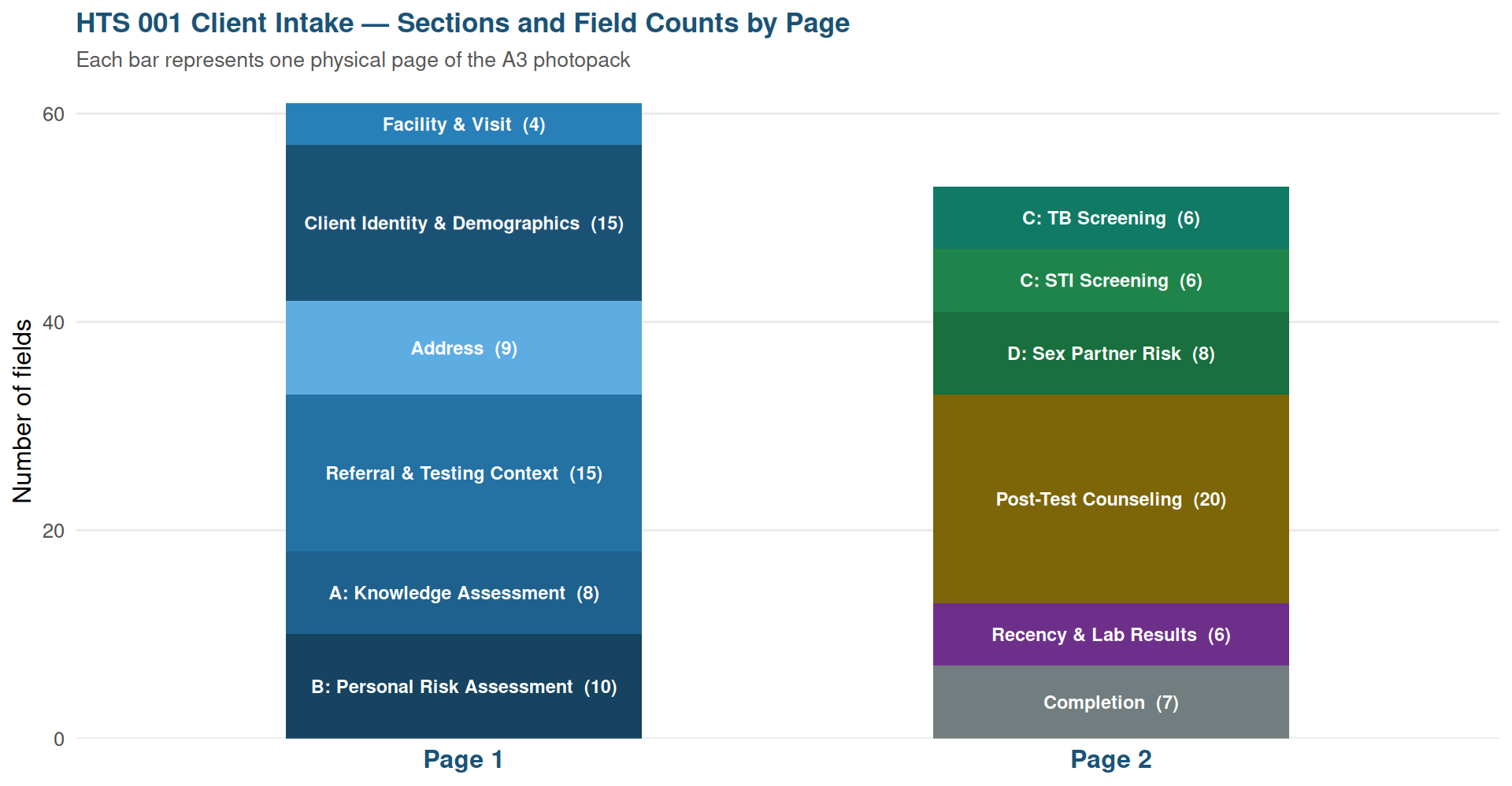
Figure 1: Thematic sections across the two pages of the HTS 001 Client Intake Form

How ScanForm Processes This Form

flowchart LR
  A["πŸ“ Clinician\ncompletes paper form"]
  B["πŸ“· Field worker\nphotographs form"]
  C["πŸ“± In-phone\nvalidation"]
  D{"βœ… Pass?"}
  E["⚠️ Alert: correct\n& retake photo"]
  F["πŸ“€ Photo submitted\nto server"]
  G["πŸ€– Server-side\nOCR processing"]
  H["πŸ” Pipeline DQA\nchecks"]
  I["πŸ’Ž Refinery\nmodels"]
  J["πŸ“Š Metabase\ndashboards"]

  A --> B --> C --> D
  D -- No --> E --> B
  D -- Yes --> F --> G --> H --> I --> J

TipTwo layers of data quality protection

Every HTS 001 record passes through two independent quality gates before reaching dashboards:

  1. πŸ“± In-phone validation β€” runs instantly on the mobile device when the photo is taken. Checks 72 fields for missing mandatory values and multi-selected single-select questions. If any check fails, the worker is alerted immediately and must correct the paper form before submitting.

  2. πŸ” Pipeline DQA checks β€” run server-side on the full dataset after OCR processing. Apply more sophisticated logic: integer and date parsing, value range checks, score consistency validation, and cross-field clinical rules. Failures are flagged as Warnings or Errors for data manager review.


Documentation Sections

Table 2
Documentation Sections β€” What you will find
Section Description Key contents
πŸ“‹ Variables Complete inventory of every field on the form β€” variable names, field types (oval, digit box, letter box, date, handwriting), OCR models, conditional fields, and options for every single-select question. Organised by thematic section matching the physical form layout. Field type legend Β· Section-by-section field tables Β· Conditional field callouts Β· OCR model reference
πŸ”„ Data Pipeline How raw OCR data flows from the ScanForm export API through the dbt transformation layers (base β†’ pre-clean β†’ clean β†’ checks β†’ refinery) to produce analysis-ready tables. Describes key transformations, derived fields, and business logic at each stage. Pipeline flowchart Β· Layer-by-layer descriptions Β· Derived field logic Β· Data manager notes
πŸ“± In-Phone Validation The 72 automated real-time checks applied by the ScanForm mobile app at the moment a photo is taken β€” before data is submitted. Documents which fields are validated, what check type applies (required / exactly one / at most one), and the exact alert message shown to the field worker. In-phone flowchart Β· Eligibility logic Β· Validated field tables by page Β· Fields not validated
πŸ” DQA Checks The server-side data quality checks applied after OCR processing. Covers integer and date conversion checks, multiple-selection detection, and expected custom checks including score range validation, score consistency, and cross-field clinical logic. Explains Warning vs Error severity and recommended actions. Severity level guide Β· Integer / date / melt check tables Β· Custom cross-field check catalogue Β· Output column structure
πŸ“Š Dashboard Indicators 18 dashboard indicators derived from the refinery models, documented in full QED indicator template format: goal, numerator, denominator (with exact column names), disaggregations, visualization type, and data source. Covers testing volume, HIV positivity, TB/STI screening, post-test counseling, PrEP referral, and laboratory results. 18 indicator cards Β· Numerator & denominator definitions Β· Disaggregation options Β· Indicator reference table

Clinical Logic Summary

Three clinical decision rules are printed directly on the physical form and enforced in the data pipeline:

ImportantRule 1 β€” HIV Testing Trigger

Test for HIV if Personal HIV Risk Assessment Score is β‰₯ 1 AND last HIV test was more than 3 months ago.

Fields involved: risk_assessment, time_last_hiv_negative_test_result

ImportantRule 2 β€” TB Referral Trigger

If TB Screening Score is β‰₯ 1, the client must be tested for Xpert MTB/RIF or referred to a TB service.

Fields involved: tb_screening (sum of current_cough, weight_loss, fever, night_sweats, lymphadenopathy)

ImportantRule 3 β€” PrEP Referral Trigger

If client tests HIV negative AND has a Sex Partner Risk Assessment Score β‰₯ 1 (Section D), refer client for PrEP services. Additionally, if HIV negative with Risk Score β‰₯ 1 or STI evidence, recommend re-testing after 3 months.

Fields involved: hiv_test_result, sex_partner_risk_assessment, sti_screening, prep_referred


About This Documentation

This documentation website is automatically generated by QED.ai from the live form source files:

Source file What it drives
HTS_001_Client_Intake.xlsx (XLSForm) Variables page β€” field names, types, OCR models, conditional logic
banding.json Field positions, preview geometry, OCR model assignments
data_validation.py In-Phone Validation page β€” check types, eligibility rules, alert messages
*.sql (dbt models) Data Pipeline and DQA Checks pages β€” transformation logic, check definitions
export_config.json Column names and formats used in indicator definitions

The code generating this website is triggered automatically each time any of the above source files change, ensuring that documentation always accurately reflects the deployed form.


HTS 001 Client Intake Form  β€’  Version 1.6  β€’  Nigeria Documentation generated by QED.ai ScanForm